

You often feel blind when backing up, but a backup camera fixes that by showing what sits behind your vehicle on a screen. A small camera mounted at the rear sends live video to your dash display whenever you shift into reverse, giving you a clear view to help avoid obstacles and people.
This system uses simple parts you can understand: a lens and image sensor capture the scene, wiring or a wireless link sends the signal, and the screen displays it with guiding lines. Ethan Caldwell’s experience with vehicle electrical systems shows that proper power and connections make the camera reliable, and routine checks keep the image clear.
Want to know how the camera actually senses light, how installation ties into your car’s wiring, and what limits you should watch for? The rest of the article breaks down how the tech works, how to install and maintain it, and what to check when the picture goes fuzzy.
Key Takeaways
- Backup cameras give a live rear view on your dashboard when you shift into reverse.
- Reliable operation depends on correct wiring, power, and simple maintenance.
- Knowing limits and troubleshooting steps keeps the system useful and safe.
What Is a Backup Camera?
A backup camera is a small video camera mounted on the rear of a vehicle that turns on when the vehicle shifts into reverse. It sends a live view to a screen so the driver can see objects, people, and obstacles behind the vehicle.
Basic Components
A typical backup camera system includes a camera, a display, a power source, and a connection method.
The camera usually sits above the license plate or on the trunk, and has a wide-angle lens to cover the rear blind spot. It often includes infrared or low-light LEDs to improve night visibility.
The display can be an in-dash screen, a rearview mirror monitor, or a dash-mounted unit. Power comes from the reverse-light circuit so the camera activates only in reverse.
Connection types include wired (coaxial or RCA), wireless (radio link), or battery-powered modules for trailers. Each part must resist moisture, vibration, and road grime.
Purpose and Benefits
Backup cameras reduce the chance of collisions while reversing by showing the driver what sits directly behind the vehicle.
They help spot low obstacles, children, and small objects that are often missed by mirrors alone.
They also make parking easier, showing guide lines or top-down overlays on some systems. Some cameras integrate with parking sensors and automatic braking, giving audible alerts or stopping the car if a collision is imminent. These features lower repair costs and improve safety in driveways and crowded lots.
Types of Backup Cameras
Wired cameras connect to the display with a cable for a stable video feed. They tend to have fewer dropouts and simpler power wiring but require running a cable through the vehicle.
Wireless cameras send video via radio or Wi‑Fi to the display. They avoid long cable runs and are easier to install on trailers but may suffer from interference or lag.
Other variations include OEM-integrated cameras built into factory systems, aftermarket kits for any vehicle, and specialized units for trucks and RVs with wide fields of view or tilt-swivel mounts. Some cameras offer higher resolutions, night vision, and waterproof ratings (IP67/IP68) for harsh conditions.
How Backup Cameras Function
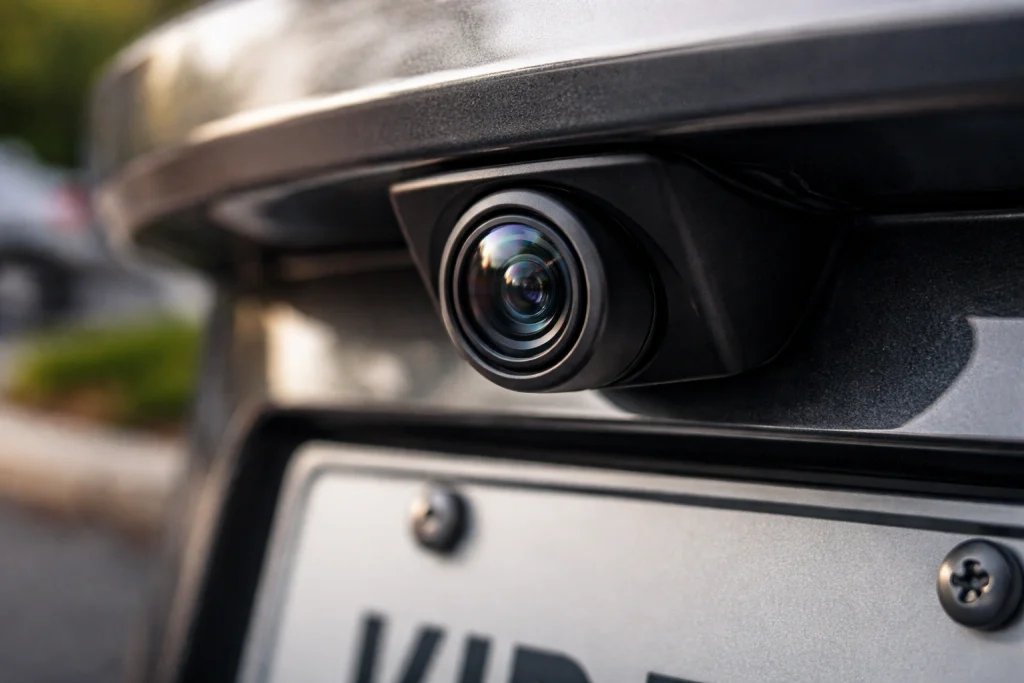
Backup cameras let drivers see behind the vehicle in real time. They capture a wide-angle image, send a video feed to a display, and turn on automatically when the vehicle shifts into reverse.
Image Capture and Processing
The camera uses a small image sensor (CMOS is most common) behind a wide-angle lens. It records a mirrored, low-light-enhanced view of the area behind the vehicle to show blind spots close to the bumper.
Onboard processing adjusts brightness, contrast, and noise reduction. Some systems use infrared LEDs for night visibility and apply digital correction to reduce lens distortion. Advanced units add overlay graphics like distance lines or trajectory paths calculated from the vehicle’s steering angle.
A simple HTML table comparing common camera components:
| Component | Purpose | Typical Feature |
|---|---|---|
| Lens | Provides wide field of view | 120°–180° fisheye |
| Sensor | Converts light to video | CMOS, low-light gain |
| Processor | Enhances image, adds overlays | Noise reduction, lines |
Video Signal Transmission
Wired systems use shielded video cables (often RCA or coax) to send an analog or digital signal to the display. These wired links are reliable and resist interference, but require routing cable through the vehicle body.
Wireless systems transmit video over 2.4 GHz or 5.8 GHz radio. They avoid cable runs but can suffer from dropouts, interference from Wi‑Fi or other devices, and reduced range. Some modern cameras use digital wireless modules that include error correction and encryption to improve stability.
Signal type affects latency and image quality. Analog signals show near‑zero lag but lower resolution. Digital links (wired or wireless) support higher resolution and added features but add processing delay.
Activation and Display Mechanisms
Most systems activate automatically when the transmission moves into reverse. The vehicle sends a reverse signal (12V trigger) to the camera or display, which powers the camera and switches the display input to the rear feed.
Displays can be factory-built in the center console, integrated with the rearview mirror, or added as an aftermarket monitor. Some head units accept multiple inputs and overlay parking guides. Advanced systems tie into the vehicle CAN bus to show dynamic guidelines that move with steering input.
Power management matters: aftermarket batteries or low-power standby modes prevent draining the vehicle battery when parked. Installation quality — secure mounts, proper grounding, and sealed connectors — affects long-term reliability.
Installation and Integration
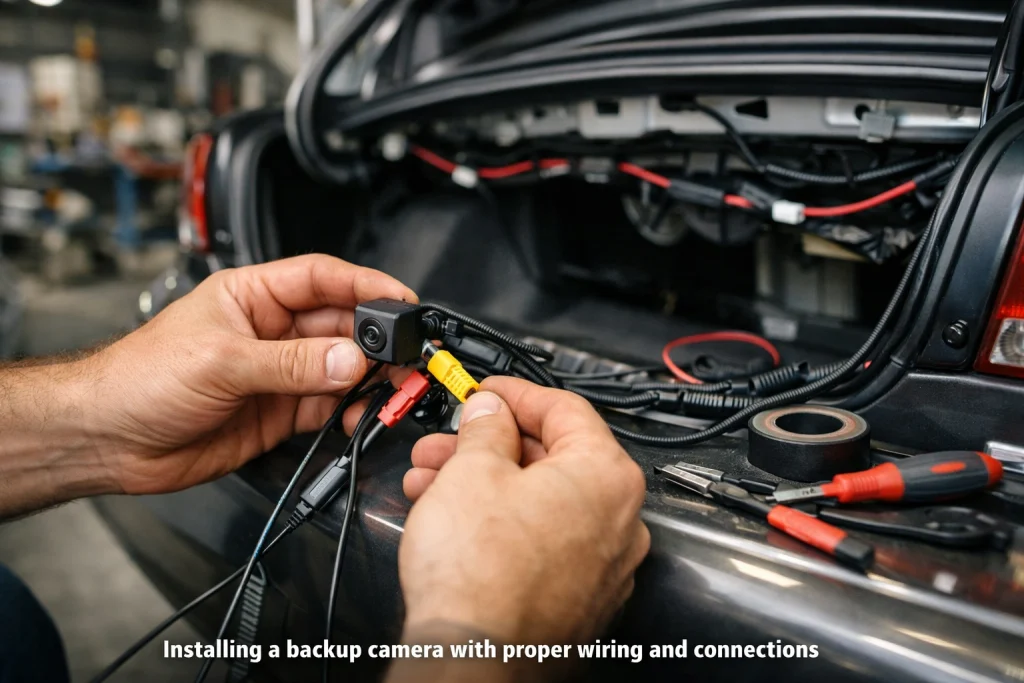
This section explains where cameras mount, how they join the vehicle’s systems, and what wiring and power steps matter most. It focuses on real installation choices, signal paths, and power needs.
Factory-Installed Systems
Factory systems come prewired and tuned for specific vehicle models. They typically mount the camera in the tailgate, trunk lid, or integrated into the rear bumper or license plate recess. The camera links directly to the car’s infotainment unit through the vehicle’s internal wiring harness and uses standard connectors to ensure signal integrity.
Calibration often occurs at the factory. The image guidelines, parking lines, and sensor fusion with parking sensors are set to match the vehicle’s dimensions. Software updates and diagnostics are handled through the OEM service tools, not by users. Replacement cameras should match OEM part numbers to avoid errors in image alignment or system warnings.
Aftermarket Solutions
Aftermarket systems offer wired, wireless, and battery-powered cameras to fit many vehicles. Wired kits use a video cable (usually RCA or proprietary) to connect the camera to an in-dash monitor or mirror display. Wireless kits transmit video over a dedicated 2.4 GHz or 5.8 GHz link; they reduce routing effort but may be prone to interference from other devices.
Buyers should check camera mounting style, image resolution, and whether the kit supplies a trigger wire that tells the display to show the camera when reverse gear engages. Many kits include adjustable brackets and night-vision LEDs. Professional installation avoids hidden wiring mistakes, but a competent DIYer can complete a wired install in a few hours with basic tools.
Wiring and Power Connections
Power for the camera usually comes from the vehicle’s reverse-light circuit so the camera only receives power when the vehicle is in reverse. Installers splice the camera’s positive lead to the reverse lamp positive, and ground the camera to the vehicle chassis. Using in-line fuses sized per the camera’s draw prevents shorts from damaging wiring.
Video signal integrity matters: use shielded video cables for wired installs and keep them away from engine harnesses to avoid noise. For wireless systems, ensure the transmitter and receiver have solid 12 V power and a secure antenna path. When routing wires, seal entry points with grommets and silicone to prevent water intrusion and use cable ties to secure runs away from moving parts.
Key Features and Technologies
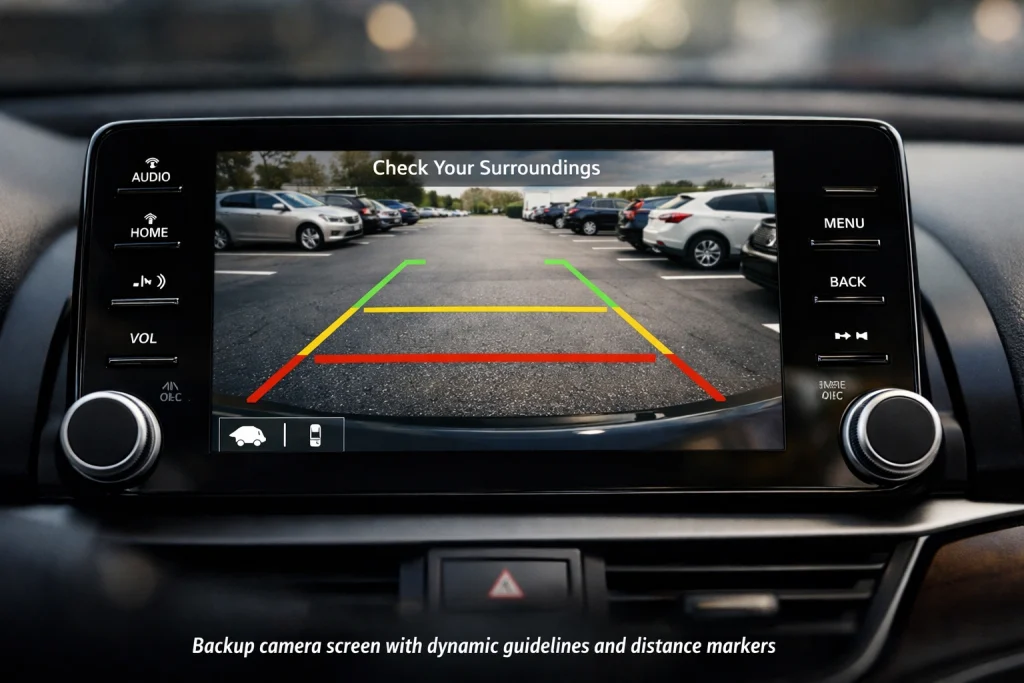
Backup cameras rely on lens choice, low-light sensing, and on-screen guidance to give drivers a clear view behind the vehicle. These features work together to improve distance judgment, detect obstacles at night, and show steering paths for safer reversing.
Wide-Angle Lenses
Wide-angle lenses capture a broad field of view, typically between 120° and 180°. A wider angle shows more of the area behind the vehicle, including sidewalks, curbs, and cross-traffic. That helps reduce blind spots but can introduce fish-eye distortion near the edges.
Manufacturers balance field of view and distortion by choosing lens focal length and using software correction. Some cameras use multi-element glass to keep center image sharp while limiting edge warping. For towing or tight reversing, drivers can pick narrower-angle lenses or models with selectable views to reduce distortion and focus on the trailer or hitch.
Key specs to check: horizontal field of view (FOV), focal length, and whether the camera supports digital de-warping. Higher-quality lenses and correction give truer distances and clearer object shapes.
Night Vision Capabilities
Night vision in backup cameras relies on sensor sensitivity and illumination. CMOS or CCD sensors with larger pixel wells capture more light, producing clearer night images. Many cameras add infrared (IR) LEDs that emit invisible light to illuminate the scene without glare.
IR works well in total darkness but produces monochrome images and reduced depth cues. Low-light-capable sensors with wide apertures and noise-reduction processing keep color and contrast in dim streetlight conditions. Some premium models combine IR and enhanced low-light sensors, switching automatically based on ambient light.
When comparing cameras, look for low-light lux rating, presence of IR LEDs, and image processing features like noise reduction and HDR for balanced exposure across bright and dark areas.
Guidelines and Overlays
Guidelines appear as lines or boxes on the screen to help judge distance and path. Static guidelines stay fixed to the screen, giving basic distance markers. Dynamic guidelines move with the steering angle to show the projected path while turning.
Overlays may include colored distance bands (green, yellow, red) that map to approximate meters or feet behind the vehicle. Some systems add obstacle alerts, top-down stitching, or parking box guides by combining multiple cameras. Accuracy depends on camera mounting angle and calibration; incorrect mounting can misplace lines by several inches.
Drivers should confirm guideline distances by testing in a safe space. For technical reference about camera mounts and field-of-view effects, see rear-view camera.
Safety and Usage Considerations
Backup cameras improve rear visibility but do not replace mirrors, turning checks, or attention to surroundings. Drivers must know camera limits and follow safe reversing habits to reduce risk.
Limitations of Backup Cameras
Backup cameras can fail in low light, heavy rain, fog, or when the lens is dirty. Night performance depends on sensor sensitivity and any built-in infrared; bright headlights or sun glare can wash out the image.
Most systems show a wide-angle view that distorts distance and size. Objects may appear farther away than they are. Small children, pets, curbs, and thin posts can be missed at the image edges or below the bumper line.
Wired systems usually give steadier images than wireless ones, which can suffer interference or dropouts. Battery-powered cameras need regular charging and may stop working unexpectedly. Software bugs, camera misalignment, or damaged wiring can also reduce reliability.
Driving Best Practices
Drivers should always check mirrors and physically look over their shoulders before reversing. Use the camera as an extra set of eyes, not the only source of information.
Clean the lens regularly and check for ice, mud, or salt buildup after bad weather. Verify the camera angle and image clarity during routine maintenance or vehicle inspections.
When maneuvering in tight spaces, go slowly and use short, controlled movements. If the camera shows proximity lines, do not rely solely on them—confirm distance by moving cautiously and listening for sensors or a spotter when available.
Maintenance and Troubleshooting
Regular checks and basic care keep the camera clear and the wiring intact. Simple fixes like cleaning the lens, checking fuses, and inspecting connectors resolve most problems quickly.
Common Issues
The most frequent problem is a black or flickering image caused by a blown fuse, loose power connection, or damaged wiring near the trunk or tailgate. They should check the fuse panel first, then wiggle the camera connector while watching the display to spot intermittent contact.
Corrosion or broken wires often appear where the harness flexes. Visual inspection of wires for cracks, pinched sections, or moisture entry points helps find faults. If the display shows “no signal,” the issue may be a failed camera module or a bad video input on the head unit.
Software glitches can block the camera feed. A system reset or a firmware update for the infotainment unit may restore function. If problems persist, a technician can test voltage at the camera and replace the camera module or control unit.
Cleaning and Upkeep
Keep the lens free of dirt, salt, and ice. Wipe the lens weekly with a soft microfiber cloth and mild soapy water, then dry it to avoid streaks that blur the image.
Protect connectors from moisture by applying dielectric grease to non-powered plugs and using heat-shrink tubing on repaired splices. Inspect the mounting area for loose screws and tighten them to stop vibrations that can loosen wires.
In winter, remove ice gently; do not use sharp tools that can scratch the lens or housing. Schedule a professional inspection if the image is still poor after cleaning, since internal moisture or a failing sensor may need replacement.
Future Developments in Backup Camera Systems
Backup camera systems will add smarter sensing, higher-resolution imaging, and tighter links to other vehicle safety features. They will focus on better object detection, clearer low-light views, and faster local processing to cut delay.
Advanced Driver Assistance Integration
Backup cameras will tie directly into parking assist, cross-traffic alert, and automated low-speed braking systems. They will feed live video and object data to the vehicle’s ADAS computer so the car can warn the driver or apply brakes when it detects pedestrians, cyclists, or moving vehicles behind the car.
Manufacturers will use standardized data links and common APIs so cameras from different suppliers work with a vehicle’s sensors and radar. That helps features like hands-free parking and trailer-assist work more reliably across makes and models.
Latency will get lower by moving AI processing to the camera or a nearby module (edge processing). That reduces false alarms and gives faster intervention when a child or object appears quickly behind the vehicle.
Emerging Innovations
High-resolution sensors, wide dynamic range (WDR), and improved night vision will make images sharper in bright and dark areas. Cameras will include HDR and infrared options to show details in shadowed driveways or under streetlights.
Computational imaging and multi-camera stitching will create 360° and bird’s-eye views with fewer blind spots. AI will label objects on-screen (pedestrian, bike, mailbox) and estimate distance with better accuracy than simple guidelines.
Wireless designs and in-cabin displays will become more robust, with encrypted video links and lower interference. Fleet and RV systems will use modular cameras that swap between vehicles and connect to telematics for remote diagnostics and firmware updates.
FAQS
What does a backup camera do?
It shows the area behind a vehicle on a screen to help the driver when reversing. It reduces blind spots and makes parking and hitching trailers easier.
How does a wired camera connect?
A wired camera uses a cable to send video to the car’s display. This gives a steady signal but can take more time to install.
How does a wireless camera work?
A wireless camera transmits video using radio or Wi‑Fi to a receiver or monitor. It can be quicker to fit but may face interference from other electronics.
Do backup cameras work at night?
Many cameras include night vision LEDs or low‑light sensors. These features improve visibility in low light but won’t match daylight clarity.
Are backup cameras a legal requirement?
Laws vary by country and vehicle type. In many places, new cars must include rearview cameras, but older vehicles often do not.
Can a backup camera replace mirrors?
No. Cameras add extra visibility but do not replace side and rearview mirrors. Drivers should use both cameras and mirrors together.
How to keep a camera working well?
Keep the lens clean and check wiring or mounts regularly. For wireless units, keep the transmitter and receiver free of obstructions.
What about image delay or lag?
Small delays can occur, especially with wireless setups. Choose higher‑quality systems to reduce lag and improve reliability.
Conclusion
Backup cameras give drivers a clear view behind the vehicle. They send live video from a rear-mounted camera to a screen inside the car, helping reduce blind spots and low-speed collisions.
They come in wired, wireless, and integrated forms. Each type has trade-offs: wired units tend to be more reliable, while wireless units are easier to install.
Image quality, lens angle, and night vision affect how well a camera works. Regular cleaning and correct alignment keep the picture useful and accurate.
Many modern systems add guidelines or link to parking sensors and driver-assist features. These extras help drivers judge distance and avoid obstacles more easily.
When choosing a system, consider vehicle type, installation skill, and budget. A good match improves safety and lowers stress during parking and reversing.